Instagram API Limits Explained for Creators
Instagram API limits can quietly disrupt your DM campaigns, freeze automation tools, and even contribute to account restrictions if ignored. This guide explains how Instagram's API rate limits work, the difference between platform and account level limits, how messaging tiers affect your outreach capacity, and the best practices for scaling DM automation safely using Meta's official API.

DM Rocket
Published: May 2026 | Category: Instagram Growth | Read Time: 9 min
If you've ever had your DMs stop sending mid-campaign, your automation tool suddenly freeze, or your account flagged after a perfectly normal-looking day of outreach, Instagram's API limits are likely the reason.
Most creators and brand owners have no idea these limits exist until they hit one. By then, the damage is already done, a paused campaign, a flagged account, or worse, a disabled profile.
This guide breaks down exactly what Instagram's API limits are, why they exist, how they affect creators and D2C brands doing DM outreach, and how to work within them without killing your growth.
What Is the Instagram API and Why Does It Have Limits?
The Instagram API is the official gateway through which third party tools, scheduling apps, CRMs, DM automation platforms, analytics tools, are allowed to interact with your Instagram account on your behalf.
Meta controls this gateway tightly. Every action your tool takes on Instagram, sending a DM, reading a message, posting content, pulling analytics, goes through the API and is counted against specific rate limits.
These limits exist for three reasons. First, to protect the platform from spam and bot abuse. Second, to ensure fair access across all accounts and tools. Third, to enforce Meta's policies on automated behavior at scale.
When a tool hits a rate limit, the API stops accepting requests for a set period. If the tool doesn't handle this gracefully, or if it's not built on the official API at all, your account can get flagged as suspicious.
This is why the tool you choose for DM automation matters as much as the strategy itself. See how DMRocket is built on Meta's official Messaging API at dmrocket.co/product/dmrocket-ai.
The Two Types of Limits Creators Need to Know
Instagram enforces two broad categories of limits: platform level limits and account level limits.
Platform-level limits are set by Meta for all apps using the API. They define how many times any app can call the API within a given window, typically measured per hour or per 24 hours.
Account-level limits are applied to individual Instagram accounts based on factors like account age, follower count, engagement history, and whether the account has had previous policy violations. A brand new account has far lower limits than a two-year-old account with strong engagement signals.
Both types of limits apply simultaneously. Even if the platform allows 1,000 DM sends per day, your specific account might be capped lower based on its history and trust score.
Instagram DM API Limits: What the Numbers Actually Look Like
Meta does not publish all of its rate limits publicly, and the exact numbers shift as they update their systems. But based on what is known through Meta's official developer documentation and observed behavior across the ecosystem, here is what creators and brands should understand.
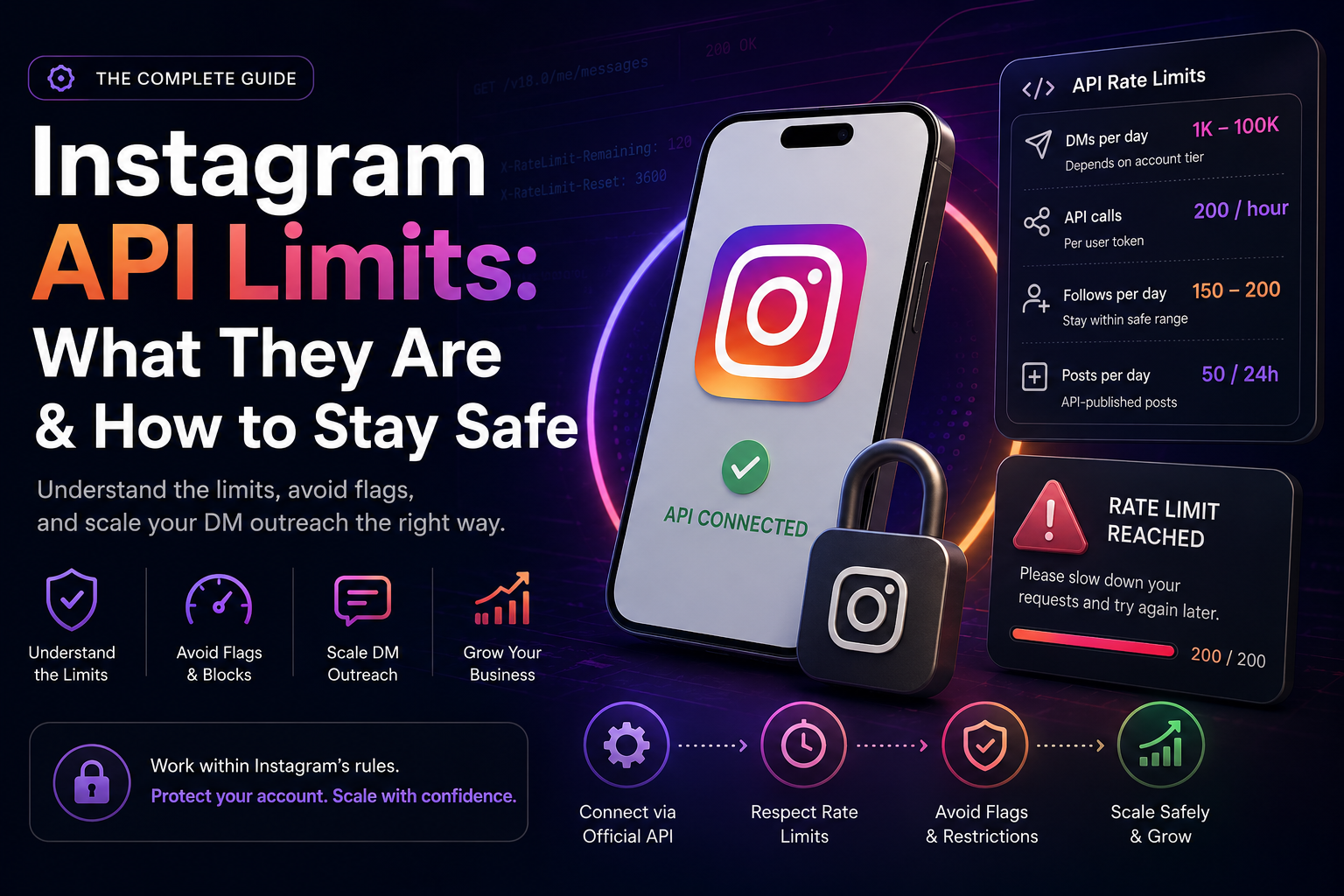
For messaging through the Instagram Messaging API, accounts can typically send between 1,000 and 100,000 messages per day depending on account tier and verification status. Standard business accounts without any special verification start at the lower end of this range.
For API calls more broadly, Meta enforces a limit of 200 calls per hour per user token by default. This covers everything, reading conversations, sending messages, fetching profile data, pulling analytics. Each action counts as one or more calls.
For follow and unfollow actions through the API, the limits are much stricter. Instagram flags anything that looks like mass following behavior, even through official tools. Staying under 60 follows per hour and 150 to 200 per day is the safe operating range.
For content publishing, accounts are limited to 50 API-published posts per 24 hours. For most creators this is not a practical constraint, but for agencies managing multiple accounts it matters.
The important nuance: these are the limits for compliant, API connected tools. If you are using a tool that operates outside the API, logging in with your username and password directly and simulating clicks, there are no "official" limits because that method is not permitted at all. Instagram's detection systems treat that behavior as bot activity regardless of volume. We covered why this matters in our post on Instagram account disables at dmrocket.co/blog/instagram-account-disabled-here-s-exactly-what-to-do.
How API Limits Affect Your DM Outreach Strategy
For any creator or brand using Instagram DMs as a sales or lead generation channel, API limits directly shape what is and isn't possible at scale.
Here is how limits show up in practice.
If you are running a comment to DM automation, where someone comments on your Reel and your tool automatically sends them a DM, each of those sends counts against your daily messaging quota. A viral Reel that gets 3,000 comments in a day can hit your limit fast if your tool doesn't have queue management built in.
If you are running outbound DM campaigns to cold or warm leads, the same quota applies. Sending 500 DMs in the first hour of a campaign is a reliable way to get your account flagged, even through a compliant tool, because the velocity itself looks suspicious.
If you are using a tool to read and categorize incoming DMs, tagging leads, routing conversations, pulling intent signals, each read action also counts against your API call budget. A high volume inbox can burn through API calls quickly if the tool is not optimized.
The solution in all three cases is the same: a well built DM automation platform manages queuing, pacing, and API call distribution automatically so you never hit a wall mid-campaign. This is one of the core infrastructure decisions we built DMRocket around, see how it works at dmrocket.co/product/features.
What Happens When You Hit an API Limit
When a compliant tool hits an API rate limit, the standard response is a temporary block on further API calls, usually lasting anywhere from a few minutes to several hours depending on how severely the limit was exceeded.
During this window, any DMs queued in your automation tool will fail to send. The tool should hold them and retry automatically once the limit resets. If your tool doesn't do this, those messages are simply lost.
If limits are exceeded repeatedly or egregiously, Meta can escalate the response, restricting the specific app's access to your account, or in severe cases flagging your account for review. This is how some accounts end up suspended even when they believed they were using a legitimate tool, the tool was compliant but was being used in a way that consistently pushed against rate limits.
The difference between a good DM automation tool and a risky one often comes down to whether it has intelligent rate limit management built in, slowing down proactively before hitting the ceiling rather than crashing into it repeatedly.
Account Tiers and How They Affect Your Limits
Meta operates a tiered system for messaging limits that most creators are not aware of. Your account's tier determines how many conversations you can initiate or respond to within a rolling 24-hour window.
Tier 1 accounts can reach up to 1,000 unique users per day. Tier 2 accounts can reach up to 10,000. Tier 3 accounts can reach up to 100,000. Moving between tiers is not something you apply for, it happens automatically as your account demonstrates consistent, high quality messaging behavior over time.
New accounts and accounts with thin history start at Tier 1. Accounts with strong engagement records, no policy violations, and steady messaging volume over several months can qualify for higher tiers.
This is one of the reasons that warming up a new account before running any DM campaigns is not optional, it is the only way to build toward higher messaging capacity without triggering flags. Sending at Tier 1 volumes on a brand new account and expecting Tier 3 throughput is a fast path to getting blocked.
How to Work Within API Limits Without Slowing Your Growth
Knowing the limits is only half the job. Here is how to build your DM strategy around them.
Start slow and ramp up. For any new account or new tool connection, start at 20 to 30 percent of your theoretical daily limit for the first two weeks. Let Instagram's systems register your account as behaving consistently before you push volume.
Spread sends across the day. Never front load your DM campaigns. A tool that sends 800 messages between 9am and 11am looks very different to Instagram's detection systems than one that sends 800 messages evenly distributed across 16 hours. Pacing matters more than total volume.
Prioritize inbound over outbound. Responding to people who have already engaged with your content, commented on a post, sent you a DM, clicked a Story link, counts differently than cold outreach to strangers. Focus your automation on inbound flows first before scaling cold outreach.
Use queue management. Any serious DM automation tool should have a built-in queue that holds messages when limits are approaching and releases them when capacity resets. If your current tool does not do this, you are flying blind.
Monitor your Account Status regularly. Go to Settings, then Account, then Account Status in the Instagram app. This shows you whether Instagram has flagged any of your recent activity. Check it weekly if you are running active campaigns.
Keep your DM content varied. Sending the exact same message to 500 people in a day is a spam signal even if the volume is within limits. Rotate templates, personalize openers, and vary the timing of your follow-ups.
If you want to understand how this plays into the broader problem of losing customer context across channels, read our post on data amnesia at dmrocket.co/blog/what-is-data-amnesia-and-how-it-s-silently-killing-your-brand-s-revenue.
API Limits vs Shadowban: What's the Difference
These two things get confused a lot, so it's worth being clear.
Hitting an API rate limit is a technical event. Your tool gets a response from Instagram's API saying it has exceeded its call budget. The tool stops making calls. Your account is not flagged or penalized as long as the tool handles this correctly and doesn't keep hammering the API after receiving the limit response.
A shadowban is an algorithmic penalty applied to your account. It suppresses your reach and visibility. It is triggered by behavior that looks spammy or inauthentic, which can include, but is not limited to, repeatedly hitting API limits in ways that suggest bot activity.
In other words: hitting a rate limit once is not a problem. Hitting it repeatedly, or using a tool that ignores rate limit signals and keeps sending anyway, is how rate limit issues turn into shadowbans or disables. We covered both of these in detail, see our post on shadowbans at dmrocket.co/blog/instagram-shadowban-vs-suspension-what-s-the-difference.
Why Official API Access Matters More Than Ever in 2026
Meta has significantly tightened its enforcement of API policies over the last 12 months. Tools that operated in grey areas, accessing Instagram through unofficial methods, simulating browser sessions, scraping data, are being detected and shut down faster than ever.
For creators and brands, this means the tool you use is no longer a minor operational decision. It is an account safety decision. A tool built on Meta's official API gives you a predictable, documented set of limits that you can plan around. A tool operating outside the API gives you no guarantees, no visibility into how close you are to a limit, and no protection if Meta's detection systems decide your behavior looks like a bot.
The brands that are scaling DM revenue reliably in 2026 are the ones that chose their infrastructure carefully. If you are still using a tool that asked for your Instagram password at signup, that is the first thing to change. See how compliant DM automation works at dmrocket.co/solutions/dtc-brands.
Final Thoughts
Instagram's API limits are not obstacles, they are the rules of the road. The creators and brands that understand them build campaigns that scale sustainably. The ones that ignore them, or use tools that ignore them on their behalf, eventually hit a wall they can't come back from.
Know your tier. Pace your sends. Use a tool that manages limits automatically. And if DMs are a serious revenue channel for your business, make sure the infrastructure underneath is built on Meta's official API, not a workaround that could disappear overnight.
Start doing DM automation the right way at dmrocket.co.
Related Articles:
Instagram Shadowban vs Suspension: What's the Difference?, dmrocket.co/blog/instagram-shadowban-vs-suspension-what-s-the-difference
Instagram Account Disabled? Here's Exactly What To Do, dmrocket.co/blog/instagram-account-disabled-here-s-exactly-what-to-do
What Is Data Amnesia and How It's Silently Killing Your Brand's Revenue, dmrocket.co/blog/what-is-data-amnesia-and-how-it-s-silently-killing-your-brand-s-revenue
DMRocket helps D2C brands, coaches, and consultants turn Instagram DMs into a real revenue channel, using AI automation built on Meta's official API. Start for free at dmrocket.co.
Ready to automate your Instagram DMs?
Join creators and businesses using DMRocket to reply faster, capture hot leads, and turn conversations into revenue.
Get Started Free